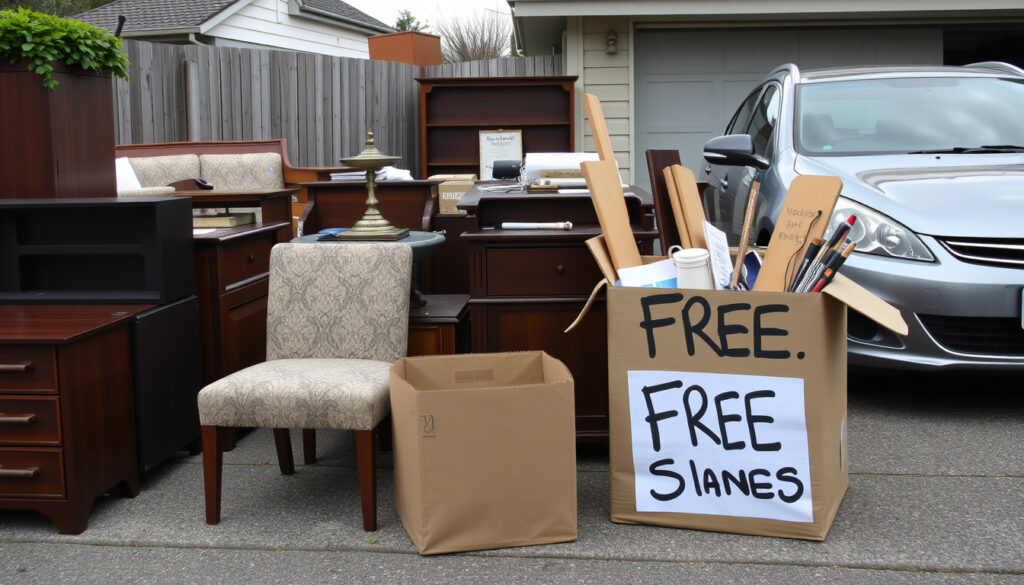
Trade Me Marketplace NZ: How to Find Furniture, Cars & Free Stuff
Anyone who’s ever tried to track down a second-hand couch or a used car in New Zealand has probably ended up on Trade Me. It’s the country’s biggest online marketplace, and for good reason — millions of listings appear every day across more than 50 categories.
Founded: 1999 ·
Members: Over 4 million ·
Listings: Millions of items across 50+ categories ·
Trust rating: NZ’s most trusted online marketplace
Quick snapshot
- Trade Me is New Zealand’s largest online marketplace, founded in 1999 (Trade Me (official site))
- Headquartered in Wellington with over 4 million registered members (Trade Me Marketplace (buying guide))
- More than 50 categories covering cars, property, jobs, and services (Trade Me Marketplace (buying guide))
- Exact number of daily active users is not publicly disclosed (Trade Me (official site))
- Annual revenue figures are available only from financial reports (Trade Me (official site))
- Trade Me’s selling guide outlines a 7-step process from account creation to after-sale support (Trade Me Marketplace (selling guide))
- Buyers can use a Book a courier service for shipping (WorldFirst (NZ ecommerce guide))
- Users can set up alerts for specific searches to catch new listings (Trade Me Marketplace (buying guide))
- Trade Me Buyer Protection covers eligible purchases, giving extra peace of mind (Trade Me Marketplace (buying guide))
Here are the key facts about Trade Me Marketplace at a glance.
| Attribute | Value |
|---|---|
| Platform launched | 1999 |
| Registered members | Over 4 million |
| Number of listings | Millions active at any time |
| Categories | More than 50 |
| Headquarters | Wellington, New Zealand |
| Listing formats | Auction and fixed price |
| Fees | Listing fees apply for most categories; buyer fees rare |
| Buyer Protection | Available on eligible purchases |
How to find free stuff near me on Trade Me Marketplace?
How to access the Free Stuff category
- Go to trademe.co.nz and select “Free stuff” from the category menu – it’s under “Home & living” or search directly.
- Listings in this section are posted by individuals often for pickup only (Trade Me Marketplace (buying guide)).
Setting your location filter
- Use the location filter to narrow results by region and city – essential for “near me” searches (Trade Me Marketplace (buying guide)).
- Sort by date listed to catch fresh giveaways first.
Safe pickup tips
- Arrange pickup in a public place during daylight hours. Trade Me’s safety guides recommend meeting at a coffee shop or shopping centre.
- Check the seller’s feedback rating before confirming pickup (WorldFirst (NZ ecommerce guide)).
The takeaway: free listings vanish fast — speed and location filtering are your best tools to snag a deal.
How to find cars on Trade Me Marketplace NZ?
Using the Motors section
- Head to Trade Me Motors – it’s the largest online car marketplace in NZ (Trade Me Marketplace (buying guide)).
- Listings include private and dealer sales.
Applying make, model, year filters
- Use the advanced search to filter by make, model, year, price range, and odometer reading.
- Save your search to get email alerts when new cars match your criteria.
Checking seller history and reviews
- Review the seller’s feedback score and read recent comments. A high rating (99%+ positive) from many transactions is a good sign.
- Buyer Protection applies to eligible purchases – check the listing for the shield icon (Trade Me Marketplace (buying guide)).
A car purchase is one of the biggest transactions on Trade Me. Using filters and checking seller history can save you thousands in hidden costs — and the Buyer Protection badge adds a safety net that private sellers on Facebook Marketplace don’t offer.
For used car parts, check out our guide on Pick A Part NZ: Locations, Stock List & Used Parts Guide and Pick a Part Auckland: Locations, Stock, and Self-Service Guide for self-service options.
The implication: Trade Me’s Buyer Protection gives car buyers a safety net that private-party sales on other platforms often lack.
How to find furniture on Trade Me Marketplace NZ?
Browsing the Home & Living category
- Under “Home & living,” furniture is broken into subcategories: sofas, tables, beds, and storage.
- Many sellers offer free shipping on eligible items (Trade Me Marketplace (selling overview)).
Using condition and price filters
- Filter by condition (new, used, refurbished) and set a max budget.
- Sort by “ending soonest” to catch auction deals before they close.
Arranging delivery or pickup
- Use the “Book a courier” service for small items, or contact the seller directly for large furniture shipping (WorldFirst (NZ ecommerce guide)).
- Wise Move suggests repairing broken areas before listing furniture – good advice for buyers too, to know what to look for (Wise Move (furniture selling tips)).
Furniture shipping within NZ can cost more than the item itself. For bulky pieces, local pickup wins on price but loses on convenience. Factor in freight quotes before you bid.
The pattern: shipping bulky items can cost more than the furniture itself — always factor in freight quotes before you bid.
How to log in to my Trade Me account?
Resetting forgotten password
- Visit trademe.co.nz/login and click “Forgot password?” – a reset link is sent to your email.
Using two-factor authentication
- Enable 2FA in account settings for extra security. Trade Me sends a code via SMS or authenticator app.
Troubleshooting login issues
- If you can’t receive the reset email, check your spam folder or use phone recovery.
- Account recovery options are outlined in Trade Me’s help centre (Trade Me Marketplace (buying guide)).
The catch: if you lose access to your recovery email or phone, recovering your account becomes much harder, so keep your details current.
What is the Trade Me website and how does it work?
Overview of marketplace categories
- Trade Me is NZ’s largest online marketplace, founded in 1999 by Sam Morgan (Trade Me (official site)).
- Categories range from cars and property to jobs, flatmates, and services.
Buying vs selling process
- Buyers browse listings, bid on auctions or buy items at fixed price; sellers create listings with photos and descriptions.
- Trade Me’s selling guide walks through seven steps: create account, create listings, promote, understand fees, make it easy for buyers, choose shipping, handle after-sale (Trade Me Marketplace (selling guide)).
Fees and payment methods
- Listing fees apply for most categories; seller success fees range from 7.9% to 9.9% depending on category (Trade Me Marketplace (selling guide)).
- Trade Me Ping charges 2.19% per transaction (1.89% for Top Sellers) (WorldFirst (NZ ecommerce guide)).
- Afterpay option costs 4.95% per transaction – more expensive but can boost sales (WorldFirst (NZ ecommerce guide)).
Trade Me is New Zealand’s biggest and most popular auction and classifieds site.
Trade Me (official site)
The implication: Trade Me’s fee structure rewards volume sellers but can be a barrier for casual users.
Upsides
- Huge variety – millions of listings across 50+ categories (Trade Me (official site))
- Buyer Protection on eligible purchases adds trust (Trade Me Marketplace (buying guide))
- Auction format can lead to great deals if you bid smart
Downsides
- Listing fees and success fees can eat into seller margins (WorldFirst (NZ ecommerce guide))
- Shipping large items like furniture can be expensive (Wise Move (furniture selling tips))
- No buyer protection on all listings – check for the shield icon
How to sell items on Trade Me Marketplace NZ
Create a free account
- Sign up at trademe.co.nz with your email and a New Zealand address.
- High-quality images and detailed descriptions increase sale chances (WorldFirst (NZ ecommerce guide)). Choose auction or fixed-price format (WorldFirst (NZ ecommerce guide)).
- Use Book a courier directly through Trade Me for easy shipping (Trade Me Marketplace (selling overview)). Local pickup works best for heavy or oversized items.
Selling on Trade Me costs more than Facebook Marketplace due to fees, but the trusted payment system and buyer protection attract serious buyers willing to pay market rates.
What this means: the fees are worth it if you want a wider, more trusted buyer pool willing to pay market rates.
Shoppers should always check a seller’s feedback and ratings before purchasing – it’s the simplest way to avoid disappointment.
Consumer NZ (consumer advice)
Clarity: what we know for sure and what’s not yet clear
Confirmed facts
- Trade Me is New Zealand’s largest online marketplace (Trade Me (official site))
- Founded in 1999 by Sam Morgan (Trade Me (official site))
- Headquartered in Wellington, New Zealand (Trade Me (official site))
- Offers auction and fixed-price listings across 50+ categories (Trade Me Marketplace (buying guide))
- Seven-step selling guide provided by the platform (Trade Me Marketplace (selling guide))
What’s unclear
- Exact number of daily active users is not publicly disclosed (Trade Me (official site))
- Annual revenue figures are available only from financial reports (Trade Me (official site))
- The exact percentage of listings covered by Buyer Protection is not specified (Trade Me Marketplace (buying guide))
- Trade Me’s algorithm for search ranking is not publicly detailed (Trade Me Marketplace (selling guide))
- The specific criteria for Top Seller status and fee benefits are not fully transparent (WorldFirst (NZ ecommerce guide))
The catch: while Trade Me is dominant, its lack of transparency on user metrics makes independent comparison difficult.
For New Zealanders looking to buy or sell second-hand goods, Trade Me remains the default choice. Its combination of auction excitement, Buyer Protection, and deep category listings gives it an edge over newer platforms. The trade-off is clear: you pay fees, but you get a trusted system that works island-wide. For furniture hunters, car buyers, and freebie seekers alike, mastering Trade Me’s search filters and seller ratings is the smartest move you can make.
Frequently asked questions
How do I contact Trade Me support?
Use the help centre at trademe.co.nz/help or submit a ticket from your account dashboard. Phone support is limited but available for urgent issues.
What payment methods are accepted on Trade Me?
Credit/debit cards, Trade Me Ping (via bank transfer), and Afterpay are accepted. Ping charges 2.19% per transaction (WorldFirst (NZ ecommerce guide)).
Is Trade Me free to use?
Browsing and buying are free. Sellers pay listing fees and success fees – typically 7.9% to 9.9% of the sale price (Trade Me Marketplace (selling guide)).
How do I list an item for sale?
Create an account, click “Sell,” choose category, upload photos, write a description, set price, and publish. The platform’s seven-step guide walks through each stage (Trade Me Marketplace (selling guide)).
What is Trade Me Buyer Protection?
A scheme covering eligible purchases if the item doesn’t arrive or differs significantly from the listing. Look for the shield icon on listings (Trade Me Marketplace (buying guide)).
Can I return a faulty item purchased on Trade Me?
Returns depend on the seller’s policy. Buyer Protection may help if the item is misrepresented. Private sellers have no legal obligation to accept returns, but Trade Me encourages good faith resolutions.
How do I delete my Trade Me account?
Go to My Trade Me > Settings > Account and select “Close account.” Outstanding fees must be cleared first.
What are the fees for selling cars on Trade Me?
Listing a car costs a success fee between $39.99 and $79.99 depending on the final sale price, plus a listing fee of around $9.99. Check the fee calculator on the site (Trade Me Motors).
For Kiwis, the choice is simple: Trade Me offers the biggest pool of buyers and sellers in New Zealand, with enough built-in protections to make transactions safe. Master the categories, set your location filters, and check seller ratings – and you’ll consistently find better deals than anywhere else.
More related posts
 Samsung Galaxy S20 FE Still Good in 2026? Review & Alternatives
 Lemon Balm Tea NZ: Benefits, Side Effects and Best Picks
 Heat Pump Hot Water: Is It Worth It? Costs, Pros & Cons
 Wellington Events Next 14 Days: Family & Free Events
 Chicken Slow Cooker Recipe: Juicy, Safe & Easy
 Westland Fiordland Heavy Rain: Orange Warnings and Climate Facts
 The Tuning Fork Auckland: Capacity, Events & Visitor Guide
 Work to Residence Visa: NZ, Ireland, US Pathways Compared
